Quick answer
A reusable AI prompt is a saved instruction template for a task that repeats. Keep the task, context, output format, constraints, review rules, and approved example fixed; change only the names, dates, notes, and source material supplied each time.
One tested prompt is worth more than twenty clever prompts buried in chat history.
Best for: teams using AI regularly but getting inconsistent results.
Time needed: about 30 minutes to build the first template, followed by five real uses to improve it.
What is a reusable AI prompt?
A reusable AI prompt is a saved set of instructions for work that happens more than once. It separates the directions that should remain consistent from the information that changes for each job.
Most people start with one-off prompting.
They type what they need in the moment, get a mixed result, adjust it, and move on. That is fine for experimenting. It is not a good team system.
If the same work happens every week, the prompt should become a reusable asset. A good template:
- Saves setup time.
- Gives different team members the same starting point.
- Makes the output easier to review.
- Records the lessons learned from previous edits.
- Helps new team members follow an agreed standard.
The aim is not to sound like a prompt engineer. The aim is to make repeated work smoother.
How to write a reusable AI prompt
The first five parts are instructions. The sixth - a good example - gives the AI something concrete to match.
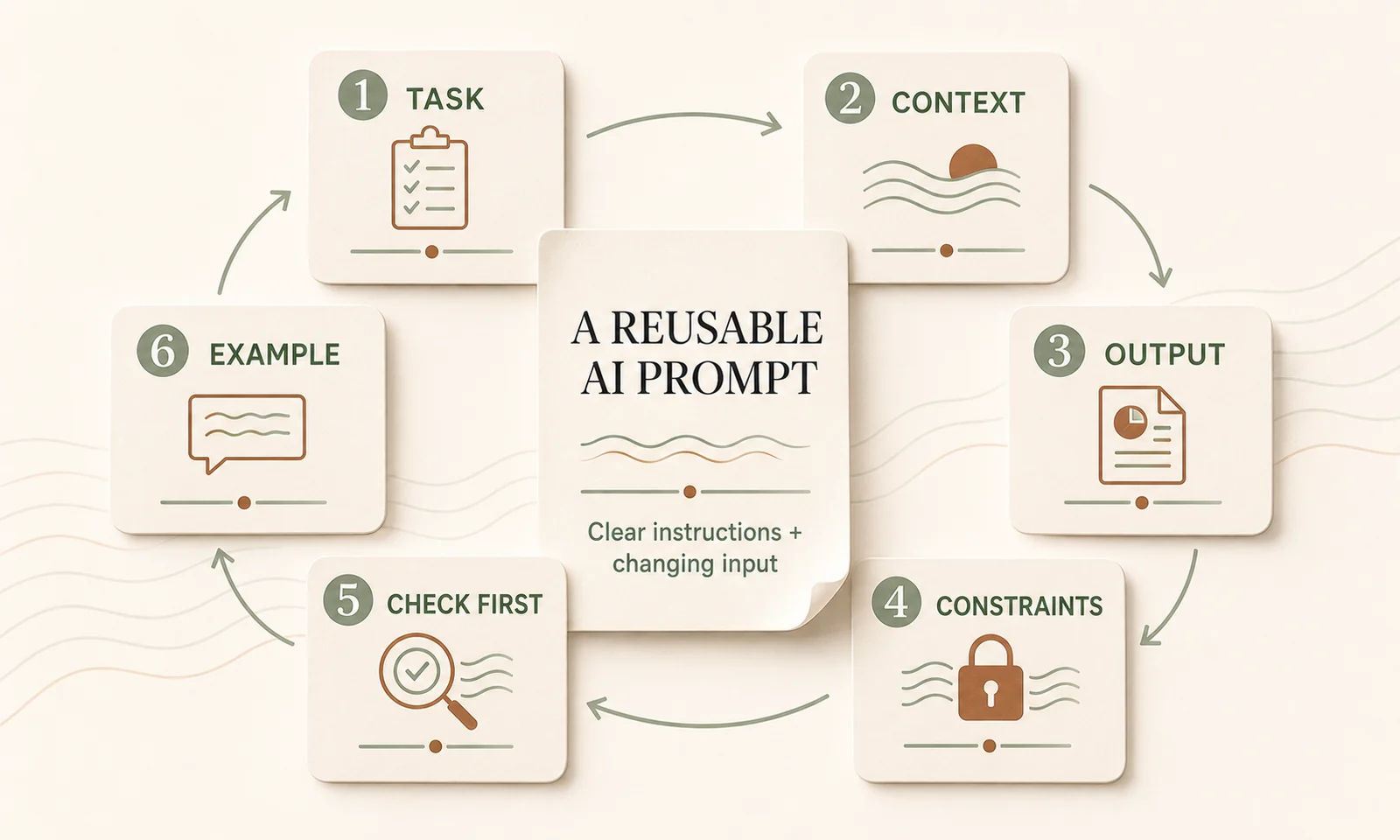
1. Task
Name the job in one sentence.
Turn these notes into a client follow-up email.2. Context
Explain who the output is for and what matters in the situation. Include the audience, relationship stage, relevant business facts, and tone.
The reader is an existing client who asked about timing, price, and next steps. Write as a warm, direct account manager who already knows the client.3. Output
Define what the finished work should contain and how it should be structured.
Return a subject line and an email with a short opening, answers to the client's questions, and one clear next action.4. Checkable constraints
Replace vague warnings with rules a person can verify.
Keep the email under 150 words. Use one call to action. Quote a date, price, or inclusion only when it appears in the notes.“Do not overpromise” is sensible but hard to test. “Use only commitments stated in the notes” is clearer.
5. Check before drafting
Handle important gaps before a polished draft makes them easy to miss.
Before drafting, identify any missing date, price, inclusion, approval, or next step. If a missing fact is necessary for an accurate email, stop and ask up to three questions. Otherwise, list any assumptions before the draft.6. Reference example
Add one strong example that already reflects your preferred tone and structure. For repeated work, an approved past email or report is often more useful than another paragraph of abstract style instructions.
Tell the AI to copy the pattern, not the facts.
Why clear structure and examples work
OpenAI’s prompt engineering guidance recommends separating instructions, examples, and context with clear headings or tags. Anthropic’s prompting guidance similarly identifies relevant examples as a reliable way to steer format, tone, and structure.
That is why the templates below put fixed instructions first, mark changing source material clearly, and include an approved example where consistency matters.
A complete client follow-up email prompt
Copy this prompt and replace the square-bracketed fields. The instructions stay fixed; the fields under INPUT FOR THIS EMAIL change each time.
TASK
Draft a client follow-up email from the notes supplied below.

CONTEXT
- Our business: [ONE-SENTENCE BUSINESS DESCRIPTION]
- Our relationship with the reader: [NEW LEAD / EXISTING CLIENT / OTHER]
- Writer's role: [ROLE]
- Preferred tone: warm, direct, calm, and useful
- Use Australian spelling.

REFERENCE EXAMPLE
Match the tone, length, and structure of this example. Do not reuse its facts.

<reference_example>
Subject: Next steps from our workflow review

Hi Priya,

Thanks for walking me through the current process on Tuesday. The most useful place to start is the weekly handover, where the team is re-entering the same information in three places.

I will send the proposed first-step workflow by Friday. It will cover the draft process, the points that still need human review, and what we would test before making any wider change.

Could you please confirm who should review the first draft with us?

Regards,
[YOUR NAME]
</reference_example>

OUTPUT
Return:
1. A specific subject line.
2. The email only after any missing-information note.
3. One clear call to action.

CONSTRAINTS
- Maximum 150 words for the email body.
- Use short paragraphs and plain English.
- Use only dates, prices, services, inclusions, and commitments found in the notes.
- Do not add claims, guarantees, discounts, or deadlines.
- Preserve the correct spelling of names and organisations.
- Do not mention that AI drafted the email.

CHECK BEFORE DRAFTING
1. Check whether the notes contain the facts needed to answer the client.
2. If a missing date, price, inclusion, approval, or next step prevents an accurate draft, stop and ask up to three questions.
3. If the email can still be drafted safely, list any assumptions or items needing confirmation before the draft.
4. Before returning the answer, check it against every constraint above.

INPUT FOR THIS EMAIL
Client name: [CLIENT NAME]
Purpose of email: [PURPOSE]
Required next action: [ACTION]

<client_notes>
[PASTE THE CURRENT NOTES HERE]
</client_notes>
Use it several times before adding more instructions. If you make the same edit after every draft, change the template so the improvement becomes permanent.
Four more prompts worth creating
These are deliberately shorter starter templates. Add one approved example to each after you know what good output looks like.
Meeting actions
For a more detailed workflow, see how to turn meeting notes into actions with AI.
Turn the meeting notes below into:
1. A three-sentence summary.
2. Decisions made.
3. Actions in a table with action, owner, and due date.
4. Open questions.
5. Risks or blockers.

Use only information in the notes. If an owner or due date is missing, write "Needs confirmation". Do not turn a suggestion into a decision.

Before the summary, list any unclear decisions or conflicting notes.

<meeting_notes>
[PASTE MEETING NOTES HERE]
</meeting_notes>
Weekly update
Turn the notes below into a weekly update for [AUDIENCE].

Use these headings:
- Progress this week
- Blockers
- Decisions needed
- Priorities for next week

Keep the update under 250 words. Use bullets. Include numbers only when they appear in the notes. Name an owner and date only when supplied.

Before drafting, list any blocker or decision that has no owner.

<weekly_notes>
[PASTE THIS WEEK'S NOTES HERE]
</weekly_notes>
Proposal outline
Create a proposal outline from the discovery notes below.

Return:
1. Client situation
2. Desired outcome
3. Proposed scope using only the listed services
4. Deliverables
5. Client responsibilities
6. Assumptions and exclusions
7. Timing and price placeholders
8. Next step

Do not invent services, inclusions, results, dates, or prices. Mark missing commercial information as [CONFIRM]. Keep claims factual and supported by the notes.

<approved_services>
[PASTE CURRENT SERVICE LIST HERE]
</approved_services>

<discovery_notes>
[PASTE DISCOVERY NOTES HERE]
</discovery_notes>
Process checklist
Turn the process notes below into a practical checklist for [ROLE].

Group the checklist into preparation, action, quality check, handover, and record keeping. Begin each item with a verb. Keep each item to one action.

Do not invent a policy or approval step. Mark unclear sequencing, ownership, safety, privacy, or compliance requirements as [CONFIRM].

Before the checklist, list the gaps that prevent the process from being followed safely.

<process_notes>
[PASTE PROCESS NOTES HERE]
</process_notes>
Separate fixed instructions from changing inputs
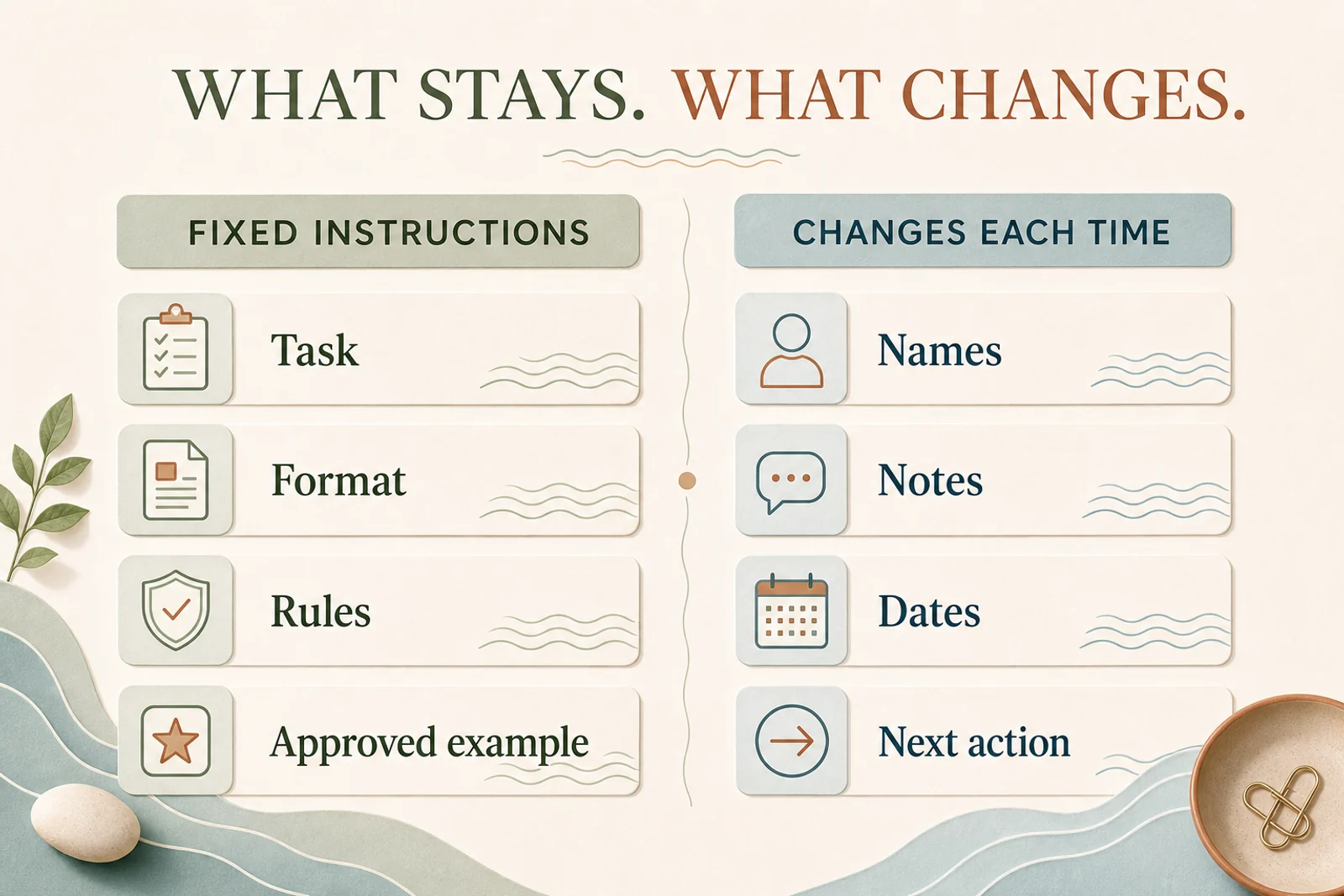
A reusable template has two layers:
- Fixed scaffolding: the task, output structure, constraints, review rules, and approved example.
- Changing input: the client name, reporting period, notes, source material, and requested action.
Keep the changing input at the end and wrap long source material in clear labels such as <meeting_notes> and </meeting_notes>. This reduces accidental edits to the instructions and makes the template easier for another person to use.
Give the prompt library one home and one owner
Create one folder or page called AI Prompt Library inside the knowledge system your team already uses. That could be SharePoint, Notion, Confluence, or a shared drive, but choose one canonical location.
Each prompt should record:
- A plain name, such as
client-follow-up-email. - The workflow owner.
- The current version and last review date.
- The reusable template.
- One approved output example.
- Two or three saved test inputs.
- Any human-review rule.
The owner updates the canonical version when the team learns something. People should link to it rather than keeping private copies that drift apart.
Keep task prompts separate from AI Project Instructions. Project Instructions hold standing business context, voice, and quality rules that apply across a workspace. A prompt template is loaded only when a specific task needs to be done.
Improve prompts with real outputs
The first version will not be perfect. Test it on several different inputs, including one messy case.
After each use, ask:
- What did it miss?
- What did it make too long?
- What did it assume?
- What did we edit every time?
- Did it pass the saved test inputs?
- What one instruction or example would prevent that problem next time?
Change the canonical prompt, then rerun the saved test cases. A fix for one email should not quietly make the other cases worse.
Prompt, template, or skill?
Use the simplest level that reliably does the job.
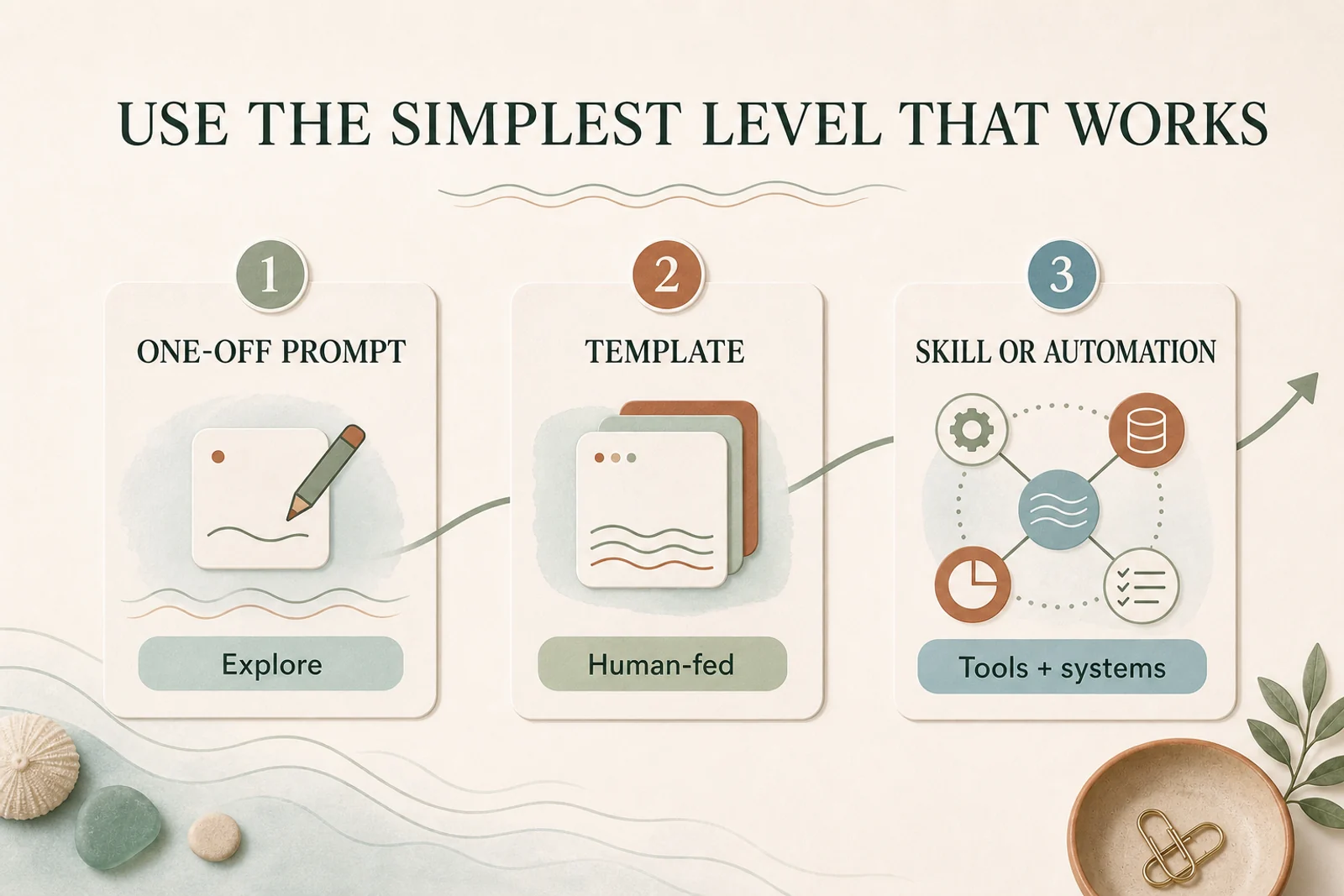
One-off prompt
Use one when you are exploring a new task and do not yet know the right output. For example, try three ways to summarise a new report.
Template
Use one when a person supplies the input, checks the result, and the work is one clear transformation. For example, paste client notes and receive a draft email.
Skill or automation
Use one when the workflow must fetch data, use tools, follow several steps, branch, or create the same formatted artifact every time. For example, collect the week’s meetings and project data, then prepare and file a weekly update.
Here, a skill means a saved AI capability that contains a procedure and may use connected tools. It is not simply a longer prompt.
Meeting actions and weekly updates often outgrow templates first because their raw material may already live in calendars, transcripts, inboxes, or project systems. A client email can remain a template for much longer when a person pastes the notes and reviews the draft.
Project Instructions sit beside this ladder rather than on it. They provide standing context to templates and skills.
Common mistakes
- Keeping reusable prompts in chat history.
- Mixing fixed instructions with the notes that change each week.
- Using vague rules such as “make it professional” without an example.
- Asking the AI to flag missing facts only after it has written the draft.
- Storing task prompts in always-on Project Instructions.
- Letting several copies drift without an owner.
- Automating a prompt before it works reliably as a human-reviewed template.
Start with one template
Choose one repeated, low-risk task. Build the template, test it on three old inputs, then use it five times in live work.
When the output becomes predictable and the review burden is low, decide whether it should remain a template or become a connected AI workflow.